

The TUI cockpit
warden tui # open the cockpitwarden # bare invocation — same thingwarden tui (or bare warden) opens a tmux-composited cockpit — a dedicated tmux session with three panes: a control pane (top-left) — a navigator tree grouped by project (a project’s agents, pipelines, plans and terminals nest under it) — a terminal pane (bottom-left) that shows a live terminal session, and a full-height agent pane (right) that opens the selected agent’s interactive session (the claude process by default). Terminals are created on demand with t inside the project under the cursor — nothing auto-spawns one. Browse the tree freely with ↑/↓ without disturbing the agent pane; press Enter to open an agent in it.
┌─ Control ─────────────┐┌─ agent-4f98 ──────────────┐│ ▾ Approvals (1) ││ ││ agent-c860 ⏳ ││ ││ ▾ Pipelines ││ (live agent session) ││ ci-refactor ││ ││ ▾ Agents (3) ││ ││ warden [~/dev] (3) ││ ││ ▸ agent-4f98 ● ││ ... ││ agent-c860 ⠿ ││ ││ agent-d01c ✔ ││ ││ ▾ Terminals (1) ││ ││ term-home ││ │├─ Terminal ────────────┤│ ││ $ warden ls ││ ││ $ _ ││ │└───────────────────────┘└───────────────────────────┘Inside Agents, agents are grouped by project: each group is a header —
<project> [<~path>] (the directory’s name, then its ~-abbreviated path) —
with its agents indented beneath it, so the tree reads section → project →
agents.
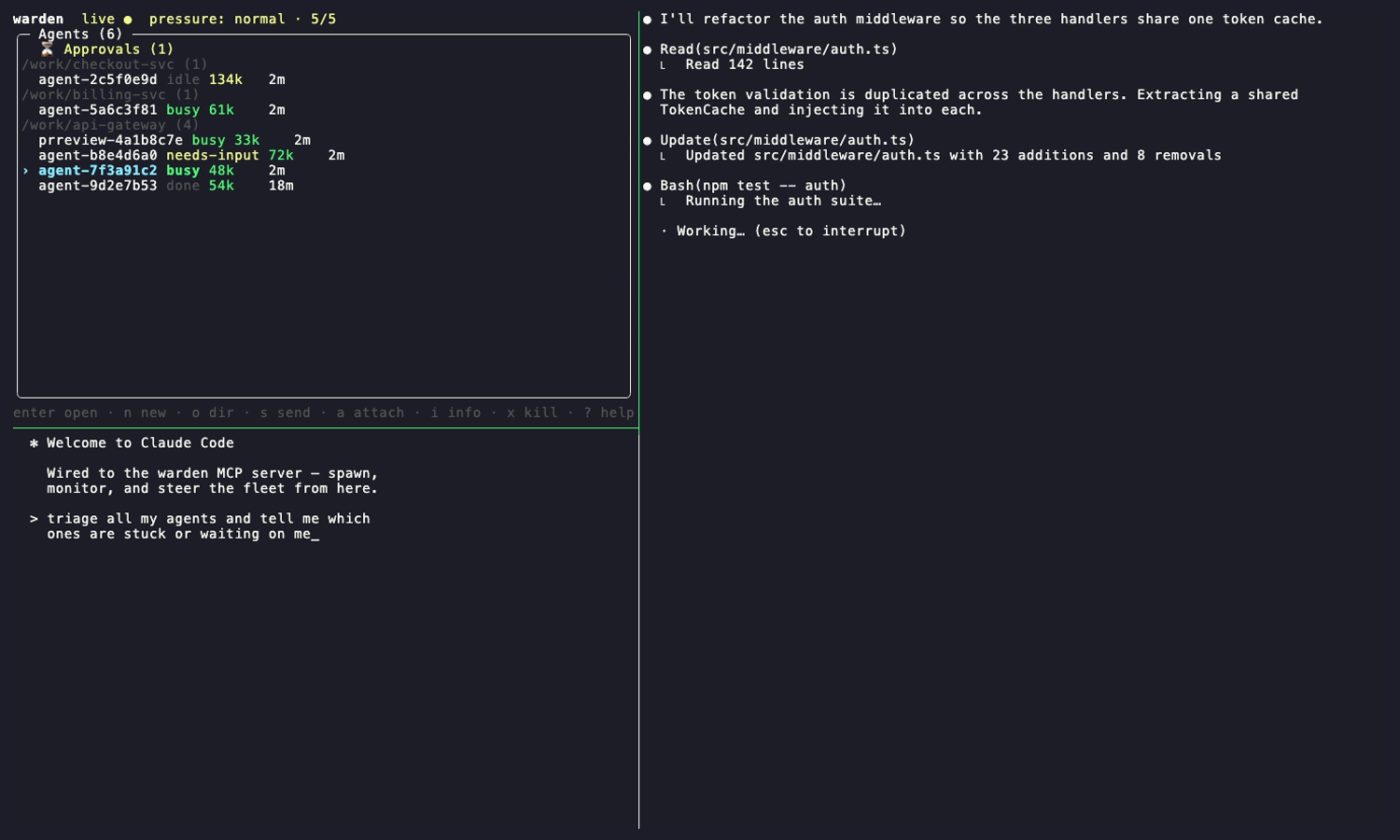
Cockpit features
Section titled “Cockpit features”| Feature | Description |
|---|---|
| Live control tree | Polls the daemon ~1×/sec; browse with ↑/↓ without disturbing the agent pane. The Agents section shows each row’s compact backend token (claude/aider/…); the full agent info pane (i) lists every stored field — backend, model, role, tags, context, location, refs, rate-limit, lifecycle, plumbing, and the last pane excerpt. An agent with no recorded backend reads as claude. |
| Live activity badge | Each agent row carries a 3–5 word status badge (e.g. Fixing failing auth tests) that Fast-Brain refreshes from the agent’s pane only while the pane is changing, at most once per activity.interval (default 15s; set it in ~/.warden/config.yaml, hot-reloaded). Idle agents cost no calls, and a failed or empty decision keeps the previous badge. |
| Project tree | The control pane is a navigator tree grouped by project; a project’s agents, pipelines, plans and terminals nest under it as collapsible groups. Approvals is a persistent section (not an overlay). |
| Pipelines section | Pipelines are the collapsible Pipelines section of the control tree; expand/collapse, open running jobs, retry failed jobs. |
| Terminals in projects | First-class terminal sessions (kind=terminal) always belong to a project and render inside it — there is no separate Terminals tab. They are created on demand only; no default terminal is spawned. |
| Agent sub-trees | Agents spawned by another agent nest under their parent as a collapsible sub-tree (▸ / ▾, indented per depth); h / ← / → toggles. See Agent sub-trees below. |
| Project groups | On the Projects tab, agents, pipelines, and autopilot runs nest under their project — a collapsible group header (▸ / ▾) reading the project name and its ~-abbreviated path plus an agent-count badge. When plan_sync.provider: hub is configured, explicit Discover results add a read-only Remote Plans section for that project, with a count badge and pending/in-progress envelopes only; the local provider shows none. The hierarchy comes from the shared project-tree service (same as GET /api/v1/tree). Open projects always show (even empty, IDE-style); work in a directory that is not yet a registered project clusters under a loose dir group; anything with no location falls into a No project bucket. ← / → collapse / expand the group under the cursor; x closes a project (see below); Enter is reserved for future project details. o opens a project (Local / Remote / New), which also becomes the spawn target for n. |
| Closing a project (hibernation) | x on a project header hibernates it, IDE-style: the project is kept in the database but hidden from the active list, and its live agents are gracefully terminated — their process ends but their worktree and transcript are kept. Closing a project that has active agents asks for confirmation first (y / N). Reopening the project restores those agents right where they left off. |
| Agent info + editing | i opens the agent info pane — every stored field for the selected agent, plus interactive controls to toggle auto-approve, cycle force-compact (inherit → on → off), and open the event log (e). See Agent info pane below. |
| In-cockpit actions | n new agent, t new/focus terminal, s send, a attach (full-screen), d digest overlay, i agent info, e event log, p approvals, c context/message inspector, l log viewer, r restore orphaned agent / retry job / reload TUI after external upgrade, u apply available update + hot-reload, x terminate/cancel, D delete pipeline record, ? help. |
| Self-update & hot-reload | When a newer GitHub release is available, the footer shows [u] Update to vX.Y.Z available (press 'u'). Press u to confirm, run the same path as warden update, restart the daemon, and syscall.Exec the cockpit in place. After an external upgrade, the footer shows [r] Warden upgraded to vX.Y.Z — press 'r' to reload TUI. Active tmux agent sessions keep running. |
| Terminal pane | Bottom-left pane shows a live terminal session (kind=terminal) — a $SHELL in a managed worktree for direct CLI access to warden commands and other terminal work. Terminals are created on demand (t), never auto-spawned. |
| Pane focus | Move focus with Alt+←/→/↑/↓ (no tmux prefix). Global Alt rotation works from any pane, even while typing: M-t cycles the terminal pane over all live terminals, M-a cycles the agent pane over all live agents, M-p cycles the agent pane over pipeline agents (pipeline order). Add Shift (M-T/M-A/M-P) to rotate in reverse; each rotation grabs focus on the pane it drives. On terminals that don’t send Alt/Option as Meta — macOS Terminal.app and iTerm2 by default — use the config-free Ctrl-b prefix fallback instead: press Ctrl-b then t/a/p (add Shift for reverse). See macOS: the Option key. |
| Opened marker (◆) | The agent (Agents section or a Pipelines job row) currently shown in the agent pane, and the terminal currently shown in the terminal pane, are marked with a ◆ — and their name carries a bold magenta badge — in the control tree. It tracks both Enter-open and the M-t/M-a/M-p rotation, so you can see what’s docked even after the cursor moves away. |
| Native scrolling | Per-agent tmux sessions enable mouse on + raised history-limit for wheel/copy-mode scrolling of long output. |
Keys (cockpit)
Section titled “Keys (cockpit)”| Key | Action |
|---|---|
↑ / ↓ or j / k | Move selection (agent pane is unaffected) |
← / → or h | Collapse / expand the project group, pipeline, agent sub-tree, or section under the cursor |
Enter | Open the selected entity in the right agent pane — agent/worker/manager/job attaches (or shows stored detail when finished); a pipeline or Autopilot container opens its overview; Enter on a terminal shows it in the terminal pane. Collapse/expand stays on ←/→ |
n | New agent — opens a prompt textarea; ctrl+n name · ctrl+r role · ctrl+t tier (live candidate table) · ctrl+s submit · esc cancel |
t | Create a terminal inside the project under the cursor (same targeting as n); refused with a status hint when the cursor is outside any project |
M-t / M-a / M-p | Global rotation (works from any pane, even while typing): M-t cycles the terminal pane over live terminals · M-a cycles the agent pane over live agents · M-p cycles the agent pane over pipeline agents. Each grabs focus on the pane it drives |
M-T / M-A / M-P | The same three rotations in reverse (Alt+Shift) |
Ctrl-b then t/a/p | Config-free rotation fallback (add Shift for reverse) — identical to M-t/M-a/M-p, but via the tmux prefix so it works on terminals that don’t send Alt/Option as Meta (macOS Terminal.app / iTerm2 default). See macOS: the Option key |
o | Open a directory as a group (becomes the spawn target for n) |
s | Send a message to the selected agent — enter to send, esc to cancel |
a | Attach — full-screen the agent’s (or running job’s) tmux session; press Ctrl-b Enter to return to the dashboard |
l | Log viewer — scrollable tail of the TUI log (~/.warden/tui.log or $WARDEN_TUI_LOG); g/G top/bottom, l/esc to close; levels coloured (ERROR red, WARN yellow, INFO cyan) |
d | Completion digest for the selected agent — scrollable overlay; d/esc to close |
i | Agent info — a scrollable pane showing every stored field for the selected agent, plus three interactive controls: ↑/↓ walk the control cursor and then scroll the body once past the last control, space toggles auto-approve and cycles force-compact (inherit → on → off), and enter on the events row (or e) opens the event log. pgup/pgdn/g/G also scroll · r rename · i/esc back |
e | From agent info: open the selected agent’s event log in the control pane (newest first); e/esc returns to agent info |
p | Answer pending approvals (also enter on the ⏳ Approvals row) — 1-9 to answer, tab for next |
c | Shared-context + message-traffic inspector |
u | When the update chip is showing: confirm and apply warden update, then hot-reload the TUI in place |
r | Restore the selected orphaned agent / retry a failed or needs-attention pipeline job — or, when the reload chip is showing, hot-reload the TUI after an external upgrade |
x | Context-sensitive: terminate the selected agent / cancel a pipeline / close (hibernate) a project — its agents are terminated and restored on reopen — / close an opened dir (confirm with y when it has active agents) |
D | Delete a stopped pipeline’s record (confirm with y) |
? | Toggle help overlay |
q | Quit and tear down the cockpit |
Bug reports
Section titled “Bug reports”When an agent crash is classified as a warden bug, a sanitized draft is staged
locally and the footer shows [⚠️ Bug Detected: Press B to Review]. B opens a
preview with Submit (s) and Dismiss (d / esc). Submit uses an
authenticated gh or shows a pre-filled issue link; Dismiss uploads nothing.
The same flow is available as warden bug-report <id> (default answer N).
Agent info pane
Section titled “Agent info pane”Pressing i on an agent opens the agent info pane — a scrollable, read-most
view of everything warden knows about that agent. It replaces the old terse detail
overlay and now surfaces every stored field, grouped into sections:
- controls — the three interactive rows (see below).
- summary — name, subject, type, backend, model, role, tags, context fill (with when it was last checked), and creation time.
- location — repo/workdir, worktree (and whether warden created or adopted it), and branch.
- refs — ticket, PR, owning pipeline/job, and parent agent.
- rate-limit — shown only when the agent has hit a limit: when it started, the scheduled resume time, and the retry count.
- lifecycle — auto-restart count, last restart, last auto-
/compact. - plumbing — pid, tmux session, exit code, backend session id, initial prompt.
- pane — the last captured pane excerpt.
The top controls block is interactive — move the cursor with ↑/↓ and act
with space / enter. The arrows are scroll-aware: they first walk the cursor
through the three control rows, then hand off to line-scrolling the field dump
once you press past the last control, so the whole pane is reachable with the
arrows alone (↑ scrolls back up and re-enters the controls at the top):
| Control | Action |
|---|---|
| auto-approve | space toggles this agent’s per-agent auto-approve override on/off (auto-answers yes/no tool prompts with option 1). |
| force-compact | space cycles the per-agent force-compact override inherit → on → off — inherit follows the global token_force_compact; on/off override it for this agent. |
| events | enter (or e from anywhere in the pane) opens the event log — the agent’s timestamped history, newest first — in the control pane. e/esc returns to agent info. |
The navigation nests one level deep: control tree → (i) agent info → (e) events,
and esc walks back out one level at a time (events → info → tree). Edits apply
immediately via the daemon (the same paths as warden approval answer-policy and the
set_force_compact MCP tool), and the pane re-renders on the next poll so the shown
values and event count stay live. pgup/pgdn/g/G scroll the field dump; r
renames the agent.
Agent sub-trees
Section titled “Agent sub-trees”When an agent spawns another agent (via the spawn_agent MCP tool), warden records
which agent created it. The cockpit uses that parentage to nest spawned agents
under the agent that created them, so an orchestrator and the workers it fanned
out read as one tree instead of a flat, indistinguishable list:
┌─ Agents (4) ──────────────────┐│ ▾ agent-4f98 busy │ ← orchestrator (root)│ agent-c860 busy │ ← spawned by agent-4f98│ ▾ agent-d01c busy │ ← spawned by agent-4f98, has its own child│ agent-9b22 idle │ ← spawned by agent-d01c└───────────────────────────────┘- Collapsible, arbitrary depth. Any agent with children shows a
▸ / ▾header — the same affordance pipelines use. Pressh/←to collapse its sub-tree,→to expand. Nesting follows the real spawn depth (A → B → C …). - Zero change to the flat case. An agent with no parent and no children looks and behaves exactly as before.
- Tombstones — parents never orphan their children. If you delete a parent
that still has live descendants, it does not vanish. It stays as a muted
terminated tombstone header showing
terminated · N running, with no terminal/attach pane — exactly like a completed pipeline job renders. The daemon reaps the tombstone automatically once the whole sub-tree has gone terminal. A parent that simply finishes on its own while children are still running renders the same way. Enteron a finished agent or tombstone opens its stored detail in the right pane (status, location, output, digest) instead of attaching to a dead tmux session. A live agent still attaches as usual.
The parentage is also available over the API (parent_id on each session), so
other surfaces can mirror the tree.
Getting back from an attach
Section titled “Getting back from an attach”Attaching moves your single tmux client onto the agent’s session (tmux can’t nest an attach), so use Ctrl-b Enter to jump back to the dashboard — not Ctrl-b d. Ctrl-b d still works but it detaches the cockpit to the background rather than returning to it; the cockpit survives (it’s reaped on your next warden tui), so an accidental detach no longer destroys your dashboard. Only q tears it down.
macOS: the Option key
Section titled “macOS: the Option key”The global rotation keys are Alt-based (M-t/M-a/M-p and their Shift reverses). On macOS the Alt key is Option, but by default Terminal.app and iTerm2 do not send Option-combos as Meta — pressing Option+a inserts a special character (å) rather than the ESC+a that tmux needs, so the Option+… rotation never fires. You have two ways around this:
- Use the prefix fallback (nothing to configure). Press
Ctrl-b(the tmux prefix) thent/a/p— addShiftfor reverse. It runs the exact same rotation and works on any terminal, becauseCtrl-bis a plain control byte every emulator sends. - Or make Option behave as Meta, then
Option+t/a/pwork directly:- Terminal.app — Settings → Profiles → Keyboard → check “Use Option as Meta key.”
- iTerm2 — Settings → Profiles → Keys → set Left Option key: Esc+.
This only affects the Alt/Option rotation shortcuts; every other cockpit key (including pane-focus Alt+←/→/↑/↓, which many terminals send fine) is unaffected.
Requirements
Section titled “Requirements”The cockpit requires tmux ≥ 3.1 — it composites real tmux panes, and there is no single-pane fallback if tmux isn’t installed. From a plain terminal it builds its own tmux session and attaches. From inside an existing tmux session (where a plain attach would nest), warden detects $TMUX and lays the cockpit out as a native tmux window in your current session instead — a leaner two-pane layout (control + agent, no terminal pane) that uses your own tmux keybindings, copy-mode, and resizing; q closes only the cockpit window. In native-window mode the terminal features (t, Enter on a terminal, M-t) degrade to a status hint. Force the native window with warden tui --tmux-native, or force the classic three-pane own-session cockpit with env -u TMUX warden tui. The control pane polls the daemon about once a second, so the daemon must be running before you open the TUI.