

Pipelines (DAG)
A pipeline is a separate entity with project_id and optional parent_agent_id.
Creating one auto-registers (or reopens) its project — no warden projects open needed first.
Its owning agent lists it in child_pipelines[]. Job agents remain members of
Project.agents[], but are reached through pipeline jobs (pipeline_id), never
through the owner’s child_agents[]. Ownership does not change DAG scheduling.
A pipeline is a DAG of agent jobs defined in YAML. The daemon runs it: jobs with no dependencies start first, and each job’s emit publishes its output and unblocks its dependents — so a “lead” orchestrator agent stays off the critical path. Author from a YAML spec (warden pipeline create <spec.yaml> or -f), from a built-in template (warden pipeline create --template …), or over MCP (create_pipeline/start_pipeline). The TUI and web show + control pipelines but don’t author them.
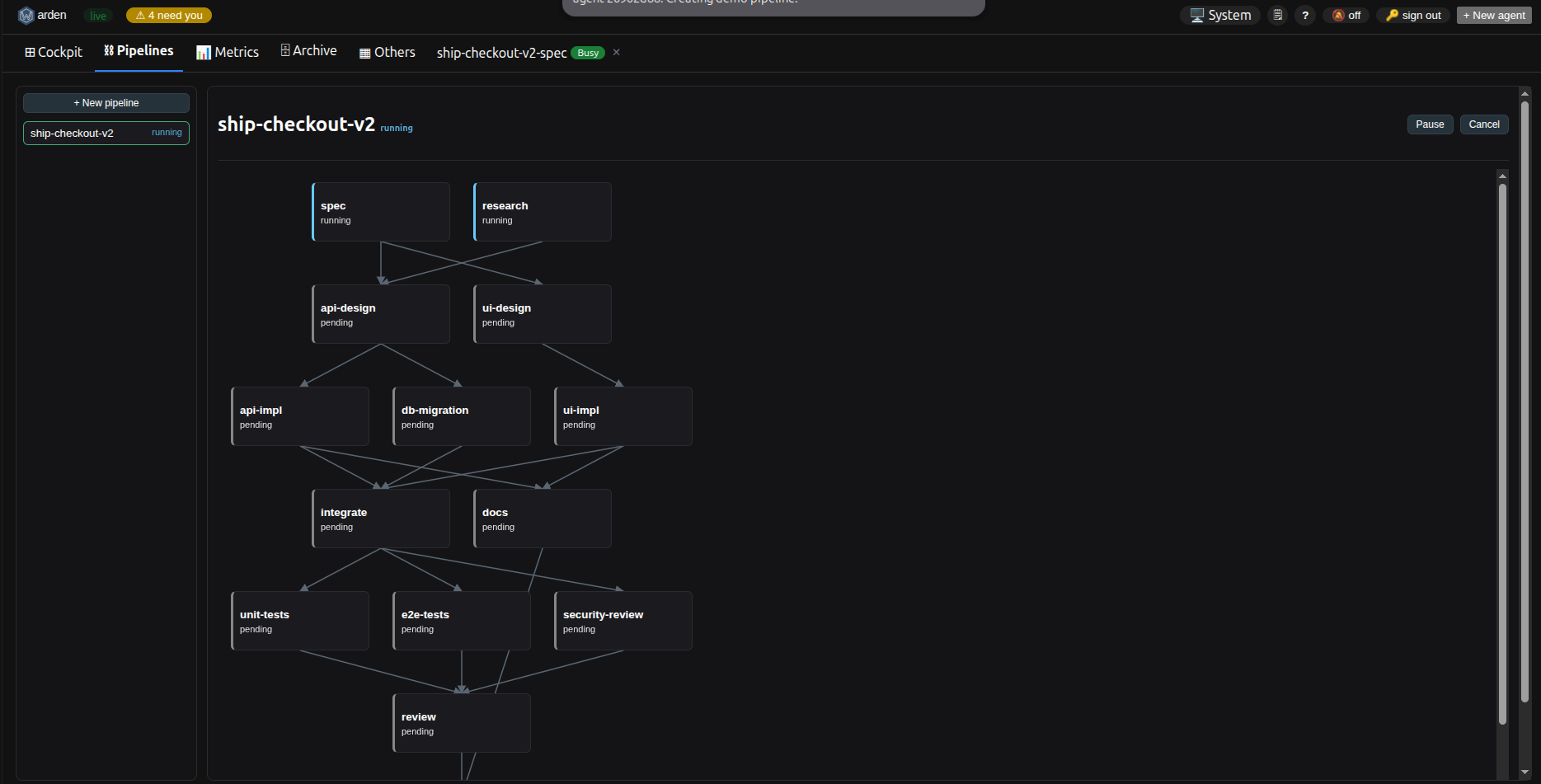
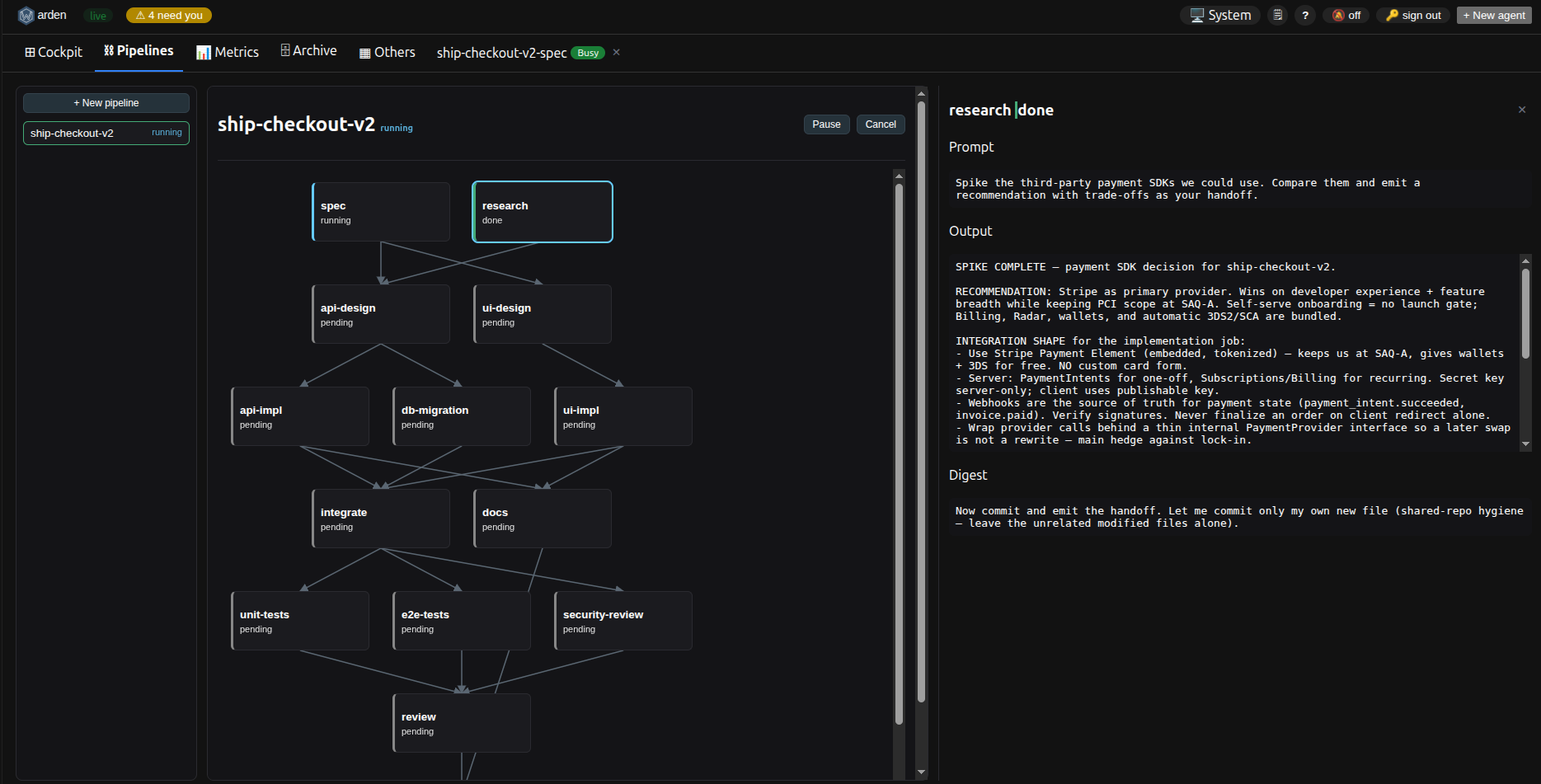
Selecting a job opens a drawer with its prompt, emitted output, and completion digest — plus Cancel (pipeline) / Retry (job) controls and an Open terminal link to a running job’s session:
Lifecycle
Section titled “Lifecycle”warden pipeline template list # show the built-in templates + placeholderswarden pipeline validate review.yaml # check the spec (DAG/refs/cycles); exit 0/1, no daemonwarden pipeline create review.yaml # validate + register (does NOT start)warden pipeline create review.yaml --start # create and start in one stepwarden pipeline create -f review.yaml --json # -f still works; --json for scriptingwarden pipeline start <id> # spawn jobs with no dependencieswarden pipeline show <id> # jobs table (status, agent, backend, after, branch)warden pipeline show <id> --watch # refresh until done/stalled/canceledwarden pipeline show <id> --prompts # also print each job's prompt and handoffwarden pipeline show <id> --all-jobs # include warden-injected span-out/span-in jobswarden pipeline show <id> --json # full machine-readable viewwarden pipeline list # current projectwarden pipeline list --all --status running,pausedwarden pipeline list --project ~/dev/app --jsonwarden pipeline pause <id> # let in-flight jobs finish; spawn no new oneswarden pipeline resume <id> # spawn jobs that became ready while pausedwarden pipeline job show <id> <job> # full detail for one jobwarden pipeline job retry <id> <job> # re-run a failed/needs-attention jobwarden pipeline job edit <id> <job> --prompt "…" # edit a still-pending jobwarden pipeline cancel <id> [--yes] # terminate running jobs (confirms if any are live; cannot restart)warden pipeline delete <id> [--yes] # remove the record (always confirms; cancel first if live)pipeline list defaults to the project of the current directory (--all for every project, --project to pick one). Span-out/span-in jobs are created by warden for fan-out/join — hidden by default in show, marked [warden] with --all-jobs, and cannot be edited or retried. A pipeline run by a plan is controlled with wd plan pause|resume|stop — the pipeline pause/resume/cancel/delete verbs refuse it.
Removed in this release: pipeline edit-job → pipeline job edit; pipeline retry → pipeline job retry; pipeline list-templates → pipeline template list.
Built-in templates
Section titled “Built-in templates”Skip writing YAML for common shapes — warden pipeline create --template <name> --set KEY=value renders a built-in template (embedded in the binary) and registers it. warden pipeline template list prints each template and its placeholders.
| Template | Shape | Placeholders |
|---|---|---|
analyze-implement-review | Analyze a task, implement on a fresh branch, then review the result | NAME, REPO, TASK |
parallel-tasks | Run two independent tasks in parallel, then integrate their branches | NAME, REPO, TASK_A, TASK_B |
test-fix-verify | Reproduce a failing test, fix the cause, then verify the fix holds | NAME, REPO, TASK |
research-synthesis | Research a topic from two angles in parallel, then synthesize | NAME, REPO, TOPIC |
warden pipeline create --template analyze-implement-review \ --set NAME=refactor-auth --set REPO=/path/to/app \ --set TASK="extract the token-refresh logic into its own module"A minimal analyze → implement → review chain. Important: job prompts must not mention emit — the daemon auto-appends the emit step and auto-injects each upstream job’s output into the dependents’ prompts.
name: refactor-authrepo: /Users/me/workspace/appjobs: - id: analyze prompt: "Analyze the auth module; no code yet." worktree: none - id: implement prompt: "Implement the refactor described upstream." depends_on: [analyze] worktree: fresh handoff: "the branch name and a 2-line summary" - id: review prompt: "Merge the implement branch, review, run the suite." depends_on: [implement] worktree: from:implementEach job’s agent finishes by running warden pipeline emit "<handoff>". The pipeline and job IDs are injected into every job’s environment automatically (WARDEN_PIPELINE_ID, WARDEN_JOB_ID), so the agent just runs the command with no flags. Emitting publishes the handoff text to shared context, marks the job done, and unblocks any dependents.
Results are durable in the pipeline record (warden pipeline show), the shared context (pipeline.<id>.<job>.output), and each job’s git branch — they are not tied to the (possibly reaped) live agent.
Worktree strategies (worktree: field)
Section titled “Worktree strategies (worktree: field)”| Value | Behaviour |
|---|---|
none | Agent runs in the repo root; no git worktree created |
fresh | A new git worktree is created on a branch named <pipeline>-<job> off HEAD |
from:<job> | A new git worktree is created off the upstream job’s branch (for fan-in merges) |
worktree: from:<job> bases a job’s git worktree on the upstream job’s branch. A fan-in job (e.g. review above) does the git merge itself as part of its prompt work.
Failure behaviour
Section titled “Failure behaviour”If a job’s agent session enters errored or orphaned, the job is marked failed, its descendants are marked skipped, and the pipeline status becomes stalled. Jobs that were already running are not interrupted — only pending descendants are skipped. A stalled pipeline can be inspected with pipeline show and cleaned up with pipeline cancel.
Pipeline status values
Section titled “Pipeline status values”| Status | Meaning |
|---|---|
pending | Created, not yet started |
running | At least one job is in progress |
done | All jobs finished successfully |
stalled | A job failed; its descendants have been skipped |
canceled | Explicitly canceled by the user |
Editing and recovery
Section titled “Editing and recovery”warden pipeline job edit <pipeline> <job> --prompt "..." --handoff "..."warden pipeline job retry <pipeline> <job>warden pipeline job show <pipeline> <job>job edit tweaks a job’s prompt and/or handoff before it starts (pending jobs only). Span-out/span-in jobs warden injects for fan-out/join cannot be edited or retried. If a job’s agent goes quiet without emitting (its session is flagged idle by stuck-detection), the job is marked needs_attention rather than silently stalling — the pipeline stays running and the job is shown flagged. Resolve it by pipeline emit-ing on the job’s behalf (if the agent actually finished) or pipeline job retry, which tears down the stale job session/worktree, resets the job, reopens any descendants that were skipped, and re-runs from there.
Plan-owned pipelines
Section titled “Plan-owned pipelines”A pipeline started by wd plan run --mode pipeline belongs to its plan. pipeline pause, resume, cancel and delete refuse it and name the plan command to use instead (wd plan pause, resume, stop, or stop then archive). Showing it and job-level retry/edit/emit still work.
Restarting a plan-bound pipeline
Section titled “Restarting a plan-bound pipeline”A pipeline created by wd plan run --mode pipeline is reopened with
wd plan restart <plan-id> (a plain pipeline resume still only accepts a paused
pipeline). Destructive — confirm with --yes. Live job agents are terminated
and worktrees removed; done jobs and their handoffs are kept; failed,
needs_attention, skipped and unfinished jobs are reset to pending and re-run
with fresh agents, using any branch that has commits as their base. Reset jobs’
prompts carry a ## Restart context. No --force is needed once the pipeline is
canceled/stalled or every non-done job is failed/needs-attention/skipped with no
working agent; a running or paused pipeline with a working agent needs --force.
See Recovering a stuck plan.
Automatic brain consult for stuck jobs
Section titled “Automatic brain consult for stuck jobs”If the job is still needs_attention after the watcher’s one deterministic auto-retry (AutoRetryCount ≥ 1), the daemon may automatically run a brain consult: it spawns a short-lived role=brain agent, injects a structured prompt, and executes one action from a closed set:
| Action | Effect |
|---|---|
wait | No-op; re-evaluates next tick |
nudge_agent | Sends a brief wake-up message to the stuck job’s agent |
retry_job | Tears down the stale session and re-runs the job |
mark_failed | Marks the job failed, unblocking descendants |
skip_job | Marks the job skipped, unblocking descendants |
escalate | Records an audit event and surfaces a human-readable warning |
noop | Brain could not determine a useful step |
The brain agent is torn down immediately after it replies. Every consult writes a brain_consult audit event (visible in warden inspect audit). Brain consult fires at most once per stuck episode — a new episode starts if the job is retried and gets stuck again. You can still manually retry or emit at any time.
Configuration:
brain_consult:  enabled: true        # global kill-switch; set false to disable all consults  timeout: 10m         # per-consult deadline  max_concurrent: 1    # max simultaneous brain agents across all pipelines
pipeline:  brain_consult: true  # per-pipeline override; set false to silence one pipeline