Claude Code, Codex, Cursor and Antigravity under one tool
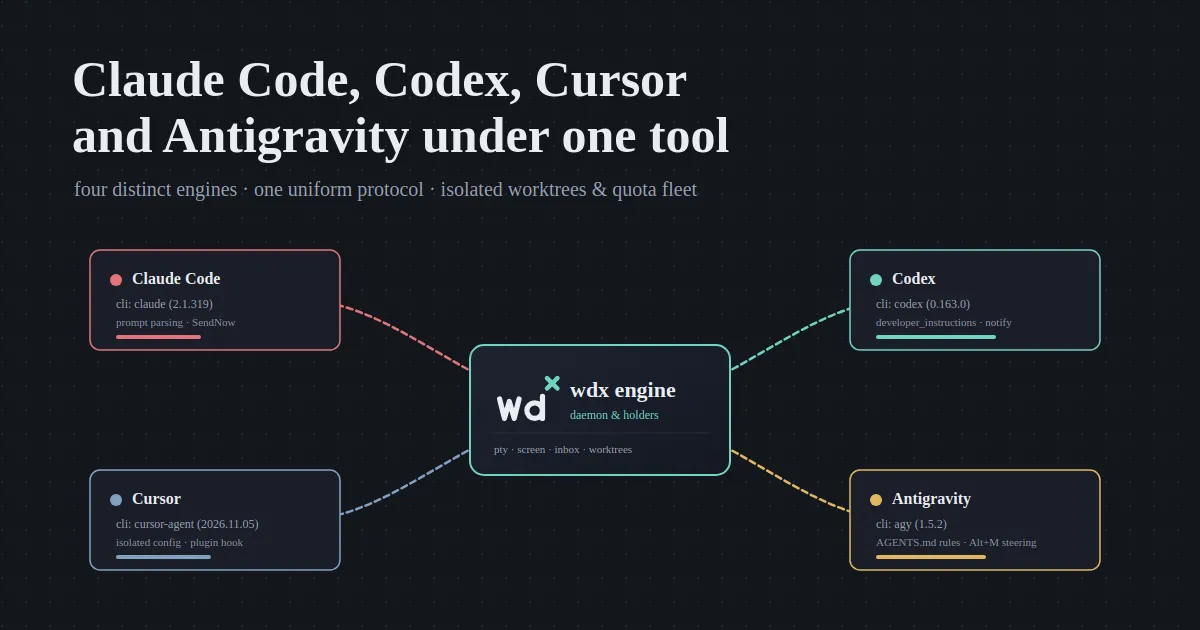
Every AI coding CLI makes its own assumptions about terminal screens, keybindings, session files, and permissions. Run four of them on the same machine and you spend more time translating between their quirks than writing code.
One tool demands alternate screens and mouse tracking; another saves SQLite databases under internal cache paths; a third expects proprietary plugin hooks for context injection; and a fourth reads developer instructions from JSONL rollout logs.
wdx treats them all as engines behind a single interface. Whether you run Anthropic’s Claude Code, OpenAI’s Codex, Cursor’s CLI agent, or Google’s Antigravity CLI, every agent operates under the same lifecycle: daemon-managed PTY holders, isolated git worktrees, screen-based state detection, non-blocking inbox queues, and unified token and quota telemetry.
The fragmentation of AI CLIs
Section titled “The fragmentation of AI CLIs”The terminal-based AI coding assistant landscape has exploded over the past year. But having access to state-of-the-art models across different providers came with severe operational friction:
- Different mental models: Each tool invents its own workflow. Some expect you to approve permissions via full-screen terminal dialogs; others require custom command-line flags. Keybindings for interrupting turns, submitting follow-up messages, or clearing context differ wildly.
- Scattered session state: When an agent finishes a task, its conversation is locked inside proprietary storage—flat JSONL logs in
~/.codex/sessions/, SQLite databases in~/.gemini/antigravity-cli/, or agent-specific chat directories in~/.cursor/. Resuming work or extracting a prompt transcript requires remembering where each CLI hid its data. - Provider lock-in vs. personal preference: Different developers on a team prefer different tools based on familiarity, token costs, or specific model capabilities:
“I personally use claude code more as compared to others and the reason for preference is just more familiarity with the product, and that is the reason I built wdx to work with multiple ACAs as everyone can have different preference but can still benefit from the wdx”
Rather than forcing everyone into one CLI ecosystem, wdx defines a clean abstraction called an ACA (AI Coding Agent). You choose the CLI per agent (--aca claude_code, --aca codex, --aca cursor, or --aca antigravity), and wdx adapts its runtime to fit.
One protocol for all four
Section titled “One protocol for all four”Under the hood, wdx does not rewrite or fork these tools. It runs the exact official CLI binaries you already have installed (claude, codex, cursor-agent, and agy) inside a managed pseudo-terminal (PTY) owned by a long-running background daemon.
This architecture gives every agent five core guarantees regardless of which provider runs it:
- Terminal isolation: Agents run in independent holder processes. If you close your terminal emulator, disconnect SSH, or reboot your window manager, the agents continue working. Reconnecting via
wdx tideorwdx agent attachinstantly restores the screen. - Worktree isolation: Agents never collide on the filesystem.
--worktree <name>automatically creates a dedicated git worktree in.worktrees/<name>, branching from HEAD. Claude Code and Codex can modify the same files simultaneously in separate checkouts without dirtying your main tree. - VT-based screen engine: Instead of relying on brittle terminal scrapers or vendor-specific telemetry APIs, wdx runs a headless virtual terminal (VT) for each agent. It parses screen output in real time to classify the agent’s state:
working,idle, orwaitingon human input. - Reliable inbox steering: When you send an agent instructions with
wdx agent send, wdx queues the message in an inbox. It waits until the agent’s PTY is in raw mode and capable of accepting keystrokes before pasting the input, preventing dropped keys. For instant interruptions (--instant), wdx executes the CLI’s native steering shortcuts to gracefully background running tasks or stop output generation. - Clean docs and structured plans: Running multiple agents quickly produces coordination chaos if task definitions and architecture specs remain unmanaged. wdx stores project documents and dependency-driven task DAGs directly in its daemon database:
“wdx docs & plans are really helpful, even if you prefer to keep your shared/published docs in google docs/ notion/ confluence etc, i’d still suggest to utilise wdx for local docs that you generate while planning and brainstroming before publishing to wider audiance, as previously i used to have mess of local uncommitted md files generated temporarily, and then overtime would forget where each file sits and what was the purpose of it, but with wdx docs the git tree is clean, all the files are in one place and is easier to find. and apart from the local docs, the plans really help me get more hands free time, as once i have done a proper planning i can leave it to wdx to execute 1 step after the other”
Here is a recording showing all four AI coding agents running together on a demo repository—inspecting available ACAs, checking account usage across providers, viewing active agents in the CLI, and navigating them inside TIDE:
Under the hood: Adapting to four different engines
Section titled “Under the hood: Adapting to four different engines”Translating four distinct AI engines into a uniform protocol requires understanding the exact quirks, flags, and filesystem behaviors of each CLI.
Claude Code (claude_code)
Section titled “Claude Code (claude_code)”Anthropic’s Claude Code CLI (claude) is the default ACA when installed. It exposes the richest terminal interface, which wdx adapts with surgical configuration:
- Disabling mouse and alternate screen: By default, Claude Code hijacks the terminal’s alternate screen buffer and intercepts mouse clicks. wdx launches it with
CLAUDE_CODE_DISABLE_ALTERNATE_SCREEN=1andCLAUDE_CODE_DISABLE_MOUSE=1. This preserves full terminal scrollback and allows TIDE to handle mouse scrolling natively. - Interactive prompt parsing: Claude Code is currently the only ACA where wdx parses structured question dialogs from the screen buffer. When Claude asks for confirmation (
yes/no) or presents multiple choices (decision), wdx extracts the prompt and options, surfacing them directly inwdx agent getand TIDE’s prompt overlay. - SendNow steering: To deliver high-priority instructions during a long generation, wdx uses Claude’s
Ctrl+X Ctrl+Sshortcut. A running command is shifted into the background rather than killed, and subsequent follow-up text is injected immediately. - Launch note injection: wdx injects its operational rules (
AGENTS.mdinstructions on how to usewdx agent send, docs, and plans) via--append-system-prompton every start and resume.
Codex (codex)
Section titled “Codex (codex)”OpenAI’s Codex CLI (codex) operates through dated rollout files and custom turn notifications:
- Developer instructions: Codex does not provide a direct CLI flag to append system prompts. Instead, wdx feeds its operational guidelines through Codex’s
developer_instructionsconfiguration, ensuring agents know how to coordinate with child agents and worktrees. - Session tracking via rollout logs: Codex writes conversational turns to
~/.codex/sessions/YYYY/MM/DD/rollout-*-<id>.jsonl. wdx monitors these files to track token usage, extract transcripts forwdx agent transcript, and restore deleted session files when resuming. - Turn tracking with notify: wdx hooks into Codex’s
notifyturn triggers to detect when execution steps begin and end, ensuring accurate state reporting inwdx agent list.
Cursor (cursor)
Section titled “Cursor (cursor)”Cursor’s terminal agent (cursor-agent) relies on an internal SQLite database and project-level configuration:
- Isolated configuration directory: To prevent concurrent agents from corrupting shared editor settings, wdx launches Cursor with a unique
CURSOR_CONFIG_DIR=<backup>/cursor-config. Each agent receives its own sandboxed copy ofcli-config.jsonwhile inheriting your global authentication and MCP server definitions. - Plugin session hooks: Cursor lacks a system prompt flag. wdx writes a lightweight plugin whose
sessionStarthook injects wdx’s instructions as initial context whenever a new conversation begins. - Synthetic statusline footer: Cursor’s terminal UI does not render its standard footer when a custom
statusLinecommand is active. wdx provides a statusline wrapper that computes token usage, renders a synthetic status bar matching Cursor’s visual style, and chains to your personal status script. - Safe workspace trust: wdx passes
--truston launch, saving trust preferences in~/.cursor/projects/<path>/.workspace-trustedand preventing unexpected prompts from aborting automated tasks.
Antigravity (antigravity)
Section titled “Antigravity (antigravity)”Google’s Antigravity CLI (agy) organizes its sessions around conversation databases and workspace rule files:
- Workspace rules (
AGENTS.md): Antigravity automatically detects and respectsAGENTS.mdfiles located in project workspaces. wdx injects its rules into a dedicated workspace folder, guiding the agent to usewdx docand child agents rather than ad-hoc scripts. - SQLite VACUUM snapshots: Antigravity stores conversation state in SQLite WAL databases at
~/.gemini/antigravity-cli/conversations/<id>.db. To safely back up and resume conversations across worktrees without locking active writers, wdx takes read-only SQLite snapshots usingVACUUM INTO. - Alt+M turn steering: When an instant message arrives while Antigravity is processing, wdx delivers
Alt+M, queuing the new instructions to be handled at the start of the next execution step.
Depth over breadth
Section titled “Depth over breadth”Building rock-solid adaptations for four completely different CLI engines requires deep protocol engineering. While the ecosystem is filled with emerging AI coding tools, wdx prioritizes reliability over superficial support:
“every ACA does things differently, you need to understand what each one does how they expose information and then parse it to general contract that wdx can understand. this is the only reason that I’m holding off for now to expand horizintally to more ACAs like Grok Build, Mistral Vibe, Qwen Code, Github Copilot CLI, OpenCode, Aider, Kilo CLI, Goose, crush etc. For now I’m focused on expanding the features that can help engineers use agents momre effectively and easily, and then jump on adding more ACAs support to wdx”
Side-by-side comparison
Section titled “Side-by-side comparison”The following table summarizes how wdx bridges the technical differences between all four supported AI coding CLIs:
| Feature | Claude Code | Codex | Cursor | Antigravity |
|---|---|---|---|---|
| CLI binary | claude |
codex |
cursor-agent |
agy |
| Tested version | 2.1.319 | 0.163.0 | 2026.11.05 | 1.5.2 |
| Launch note source | --append-system-prompt |
developer_instructions |
Plugin sessionStart hook |
Workspace AGENTS.md |
| Full permissions flag | --permission-mode bypassPermissions |
--dangerously-bypass-approvals-and-sandbox |
--force --sandbox disabled --approve-mcps |
--dangerously-skip-permissions |
| Screen state parsing | Alternate screen off, raw VT parsing | Input box & statusline inspection | Box & synthetic footer inspection | Terminal VT buffer parsing |
| Question extraction | Structured yes/no & decision |
Generic waiting |
Generic waiting |
Generic waiting |
| Turn steering | Ctrl+X Ctrl+S (SendNow) |
Paste + Enter at next step | Enter x2 at next step | Alt+M at next step |
| Context tracking | Statusline JSON telemetry | Rollout log token count | Chat store.db inspection |
Statusline JSON telemetry |
| Session storage | ~/.claude/projects/ JSONL |
~/.codex/sessions/ JSONL |
cursor-config/chats/ SQLite |
conversations/*.db SQLite |
Managing rate limits across providers
Section titled “Managing rate limits across providers”One of the largest hurdles when running multi-agent workflows is managing provider rate limits. An intensive refactoring or test generation loop can exhaust an hourly or daily quota window in minutes.
wdx usage aggregates rate limits across all four AI coding agent accounts into a single terminal report. It tracks rolling windows (5-hour session caps, weekly limits, and monthly pools), showing exact usage percentages, time until reset, and whether a model bucket is currently throttled:
antigravity Claude and GPT models available WINDOW USED RESETS AS OF Session (5 h) 0% in 4 h 57 min 14:17 Week 0% Nov 14 04:12 14:17antigravity Gemini models available WINDOW USED RESETS AS OF Session (5 h) 0% in 4 h 45 min 14:17 Week 13% Nov 14 04:13 14:17antigravity Gemini 4 Argon limited, resets Nov 17 12:11 WINDOW USED RESETS AS OF Week 100% limited Nov 17 12:11 14:17claude_code available WINDOW USED RESETS AS OF Session (5 h) 6% in 42 min 13:48 Week 1% Nov 19 10:00 13:48codex available WINDOW USED RESETS AS OF Week 16% now 14:27cursor available WINDOW USED RESETS AS OF Month 3% Dec 1 19:31 18:08This visibility unlocks flexible quota management across subscription tiers:
“when I’m running pro plans in every ACA there is more quick shuffling of ACAs so that the limit is evenly distributed, but when I have heavy work i upgrade claude to max plan which reduces the ACA shuffling, but this is just my preference, everyone can have there own way of working”
When running on Pro tiers, tasks can be distributed across providers—for example, assigning architectural reviews to Claude Code, test coverage sweeps to Codex, documentation generation to Cursor, and background audits to Antigravity. When Claude is upgraded to a Max plan, more tasks can run sequentially on Claude without risking unexpected rate limits.
One screen, any agent
Section titled “One screen, any agent”Inside TIDE (wdx tide), all four AI coding agents appear side by side in the project navigator. You can monitor their progress, inspect live worktree diffs, answer questions, and land changes with a single keystroke:
You don’t need to choose a single AI vendor or juggle four incompatible terminal setups. Run the tools you already know, distribute workloads across accounts, and let wdx handle the plumbing.
-
Install wdx:
Terminal curl -fsSL https://raw.githubusercontent.com/srjn45/wdx/main/scripts/install.sh | sh -
Verify which AI CLIs wdx detected on your system:
Terminal wdx agent acas -
Launch your fleet in dedicated worktrees and open TIDE:
Terminal wdx agent create --name review --aca claude_code --worktree review-wt --prompt "..."wdx agent create --name tests --aca codex --worktree tests-wt --prompt "..."wdx tide
Read more about each CLI adapter in the AI CLIs Overview, Claude Code, Codex, Cursor, and Antigravity documentation. The project is open source on GitHub.