Agents in TIDE
Learn how to navigate agent rows, inspect questions, and fold parent trees in Agents in TIDE.
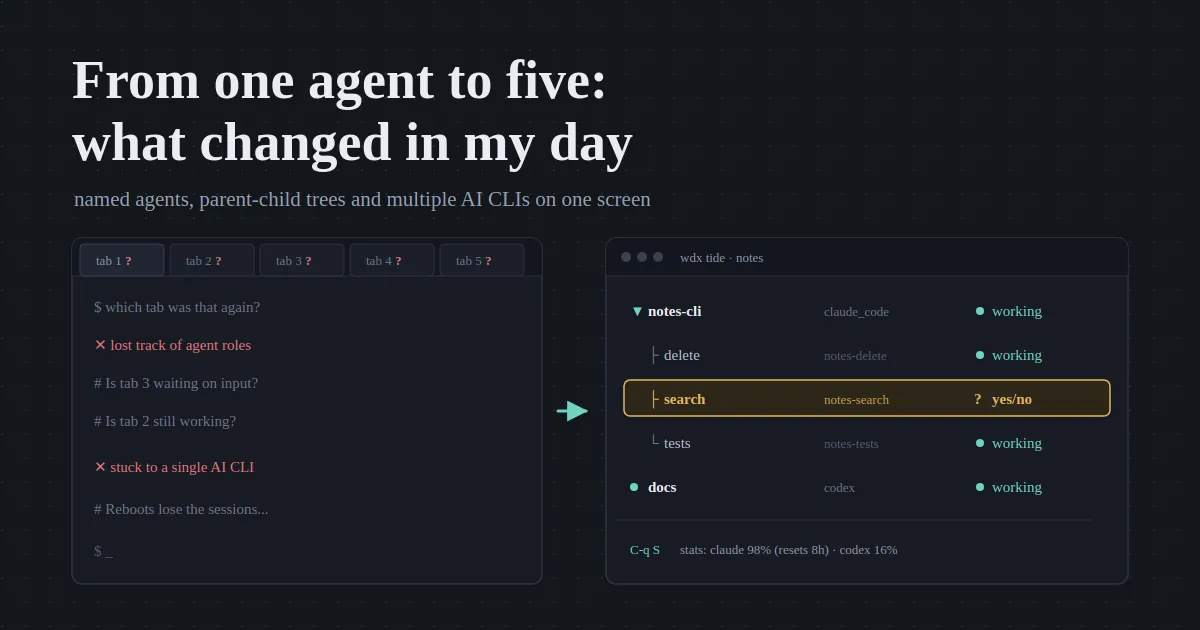
Before wdx, running AI agents meant a row of terminal tabs, and after a while I couldn’t remember which tab was doing what. The agents were fine. I was the one getting lost.
Here’s what changed when they moved onto one screen.
Before wdx, running AI agents meant cycling through a dozen terminal tabs and split panes. The friction wasn’t just the keystrokes; it was the context switching. After an hour of coding, you’d glance across your tab bar and pause: Which tab was running the test suite? Which one was refactoring the parser? And is that third tab stuck waiting for my confirmation, or still thinking?
Because managing multiple terminals was so chaotic, I naturally stuck to a single AI CLI. Even when another tool had a better model for writing documentation or quick codebase exploration, the cognitive cost of juggling different terminal windows with different workflows wasn’t worth it.
Terminal tabs gave each agent an isolated shell, but they offered zero coordination. The moment you had more than two agents running, you spent more time managing tabs than reviewing code.
In wdx, agents aren’t anonymous PTY sessions. You give each agent a name when you create it:
wdx agent create --name notes-cli --prompt "Coordinate the notes app CLI refactoring"When work gets split, wdx connects agents into a hierarchy. You can spawn child agents under a parent, each assigned to a focused subtask:
wdx agent create --parent-name notes-cli --name delete --worktree notes-delete \ --prompt "Add delete <n> to notes.py with a unittest"wdx agent create --parent-name notes-cli --name search --worktree notes-search \ --prompt "Add search <text> to notes.py with a unittest"wdx agent create --parent-name notes-cli --name tests --worktree notes-tests --permissions ask \ --prompt "Add test_notes.py with end-to-end tests"In the agent list, children are clearly indented under their parent with └. You are never left wondering why an agent exists: you see immediately that delete, search and tests are three child agents working together under notes-cli.
A parent row folds with ← and unfolds with →. When folded, it keeps your view tidy while still showing N waiting if any child beneath it needs attention.
TIDE, wdx’s Terminal IDE, puts everything on a single screen: the project pane on the left, the active agent live on the right, and project terminals below.
Visual indicators make tracking what’s happening second nature:
● for running, ? for waiting on you, ○ for exited, ✕ for failed.yes/no or decision.o on an amber row to switch to the agent’s tab, answer its question, and watch it immediately transition back to ● working.When paired with plans, tracking progress becomes effortless. As I wrote in I built wdx with wdx, wdx carries plan tasks forward one after another, letting you monitor an entire pipeline from a single vantage point.
Here is what running five agents looks like in practice on a toy project: notes-cli with its three children (delete, search, tests) in git worktrees, plus a Codex agent docs. When tests raises a permission question, it is answered directly in its tab, and C-q S opens the stats view:
Before wdx, running multiple AI CLIs simultaneously was impractical. Each tool had its own conventions, its own process model, and its own way of monopolizing your terminal.
With wdx, you can use multiple AI CLIs—Claude Code, Codex, Cursor, Antigravity—side by side on the same repository. The orchestration is handled entirely by wdx, so your interaction as a user is identical regardless of the underlying ACA:
wdx agent create --name notes-cli --aca claude_code --prompt "Refactor notes.py"wdx agent create --name docs --aca codex --prompt "Document the CLI in README.md"Each agent works in a git worktree of its own, so they never overwrite each other’s edits or step on git status. Run Claude Code and Codex side by side walks through how worktrees prevent conflicts and land cleanly on main.
One of the most frustrating aspects of running long-lived agents in standard terminal tabs is computer restarts. Close your laptop, reboot for an OS update, or crash your terminal emulator, and your active sessions vanish into the void.
wdx runs as a system service (via systemd on Linux or launchd on macOS) that starts automatically on boot or login. When the daemon starts again after a reboot, your agents aren’t lost: they are listed with state lost:
$ wdx agent listNAME STATE ACTIVITY MODEL CONTEXT ACA DIR IDnotes-cli lost claude_code /path/notes agent-facac2a3You don’t need to hunt for obscure session IDs. You simply start the agent by its name:
wdx agent start --name notes-cliIn TIDE, it’s a single keystroke: press g on the agent’s row. The agent respawns with its entire conversation history and context intact, exactly where it left off.
If you ever want a fresh session while keeping the agent’s identity, wdx agent restart (or R in TIDE) starts an empty session that reads wdx agent transcript --brief.
Moving from one agent in loose terminal tabs to five agents in TIDE transformed my daily output. Here is the commit history from wdx’s own repository around the transition:
| Period | Days | Commits | Commits / day |
|---|---|---|---|
| 26–28 Oct, one agent | 3 days | 57 commits | ~19/day |
| 29 Oct–11 Nov, wdx and TIDE | 14 days | 654 commits | ~47/day |
On the busiest single day (8 November), the team landed 89 commits.
A fair caveat: the first three days were also the start of a brand new project, where laying foundational architecture naturally takes more deliberate deliberation than adding subsequent features. But once attach and TIDE landed on 29 October, the ability to coordinate multiple agents in parallel without losing mental context more than doubled daily throughput.
When you run five agents across different providers, managing rate limits and context budgets is critical.
Pressing C-q S in TIDE (or running wdx usage from the CLI) opens the stats tab:
┬─[● notes-cli(-)]─[stats(-)]────────────────────────────[⤢]─┐
   claude_code:                available     Session (5 h):            1% ▰▱▱▱▱▱▱▱▱▱   resets in 3 h 48 min     Week:                     98% ▰▰▰▰▰▰▰▰▰▰  resets in 8 h 28 min     as of:                    01:28
   codex:                      available     Week:                     16% ▰▰▱▱▱▱▱▱▱▱   resets in 24 h     as of:                    14:27
   cursor:                     available     Month:                    3% ▰▱▱▱▱▱▱▱▱▱   resets Dec 1     as of:                    18:08
   antigravity Gemini 4 Argon: limited, resets Nov 17 12:11     Week:                     100% limited
Because you can see that Claude Code’s weekly limit is at 98%, you know it is about to exhaust. Instead of hitting an unexpected quota brick wall midway through a feature, you spawn the next task with Codex or Antigravity.
Context sizes are also visible right on each row in the agent list (e.g. 45k, 180k). The context number stays green during early turns, turns yellow once it passes context.threshold.warning, and turns red at context.threshold.critical. That visual feedback makes timely context compaction second nature.
Importantly, wdx only displays this information: it never pauses, cancels, or switches models behind your back. You remain the conductor.
While managing five agents on one screen is a massive leap forward from disjointed terminal tabs, there is still plenty to achieve:
yes/no or decision in amber—currently works best with Claude Code. Other AI CLIs still report generic waiting status. Bringing deep question parsing to Codex, Cursor, and Antigravity is an active focus.curl -fsSL https://srjn45.github.io/wdx/install.sh | shcd my-projectwdx project openwdx agent create --name lead --prompt "Review pending pull requests"wdx agent create --parent-name lead --name feature --worktree feature-branch \ --prompt "Implement the search endpoint"wdx tideAgents in TIDE
Learn how to navigate agent rows, inspect questions, and fold parent trees in Agents in TIDE.
Child agents guide
See how parent agents delegate subtasks to children in Child agents.
Stats in TIDE
Track account usage windows and model buckets across all AI CLIs in Stats in TIDE.
GitHub
Explore the source, report issues, and star the project on GitHub.