Introducing wdx
Running one AI coding agent is easy: open a terminal and start it. Running four at once is where it falls apart. One is waiting on a yes/no question in a tab you closed an hour ago. Two are editing the same files. The laptop went to sleep and took a session with it. And at the end of the day you have to piece together what each one actually changed.
wdx is what I built to run them like a team rather than a pile of terminals.
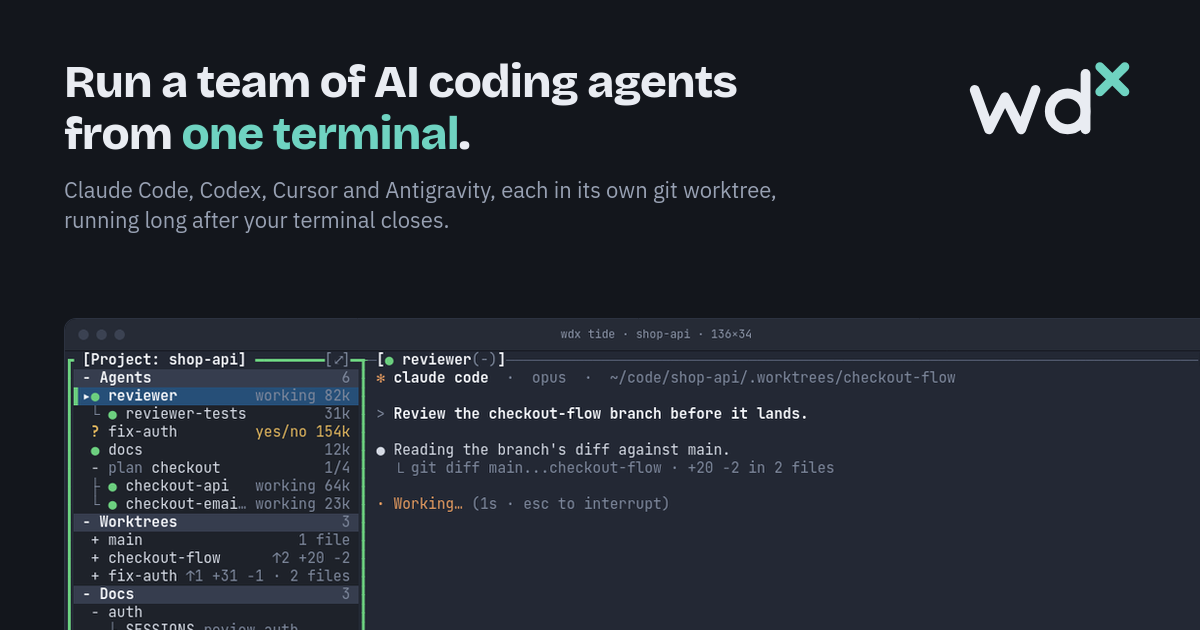
Agents that outlive your terminal
Section titled “Agents that outlive your terminal”wdx is one binary with three faces: a daemon, a CLI and TIDE, its Terminal IDE.
The daemon runs every agent and terminal in a pseudo-terminal of its own, owned by a small holder process. Close TIDE, close the terminal, restart or even update the daemon, and the agents keep working. Open TIDE again and everything is where you left it.
wdx runs the AI CLIs you already use, Claude Code, Codex, Cursor and Antigravity, with the same features on each. Its own features come first: whichever CLI an agent runs, it is created, watched, answered and resumed the same way.
Knowing who needs you
Section titled “Knowing who needs you”The hardest part of running agents in parallel is knowing which one is stuck. wdx reads each agent’s screen and tells working, waiting and idle apart, for every CLI it supports. When an agent asks a question, its row in TIDE turns amber and shows what kind of question it is. You can answer from TIDE without switching to it. Each row also shows how much of its context the agent has used.
A worktree per agent
Section titled “A worktree per agent”An agent given a worktree works on a branch of its own, so two agents never edit the same checkout:
wdx agent create --name fix-auth --worktree fix-auth --aca codexTIDE lists every worktree with what it has committed and what it has not, and shows the diff file by file. When it looks right, wdx worktree land puts it on main without a merge commit, or opens a PR.
Plans: a feature split into tasks
Section titled “Plans: a feature split into tasks”For a bigger change, a plan splits the work into tasks that depend on each other. wdx starts an agent for each task that is ready, each in a worktree of the plan’s, and lands every finished task on the plan’s branch. TIDE draws the plan the way git log --graph draws commits. A task that fails waits for you to retry it, land it or skip it.
The same features for scripts and agents
Section titled “The same features for scripts and agents”Everything TIDE can do, the CLI can do too, and every command takes --json. It then prints one JSON object with a stable error code and never prompts. That is how agents use wdx themselves: wdx help agents teaches an agent to make child agents, worktrees, docs and plans through wdx, so you see all of their work in TIDE as well.
Designs live in wdx as docs with revisions and a status, from wip to approved, so people and agents read the same thing.
Try it
Section titled “Try it”wdx runs on Linux and macOS:
curl -fsSL https://raw.githubusercontent.com/srjn45/wdx/main/scripts/install.sh | shwdx project open --local ~/code/apiwdx agent create --name fix --worktree fixwdx tideOr try TIDE right now in your browser on the home page. It is a replica that runs nothing, but it has the same layout, keys and screens.
Update — 11 November 2026: the optional self-hosted hub is now available for remote access and document uploads. See Using a hub and Running a hub. The hub is operated by you or your organisation; the project does not offer a public hosted hub. The explicit --url requirement is planned for v0.6.0; v0.5.0 users should also supply their self-hosted hub’s URL.