Plans Guide
Read the complete guide to creating and managing plans in Plans.
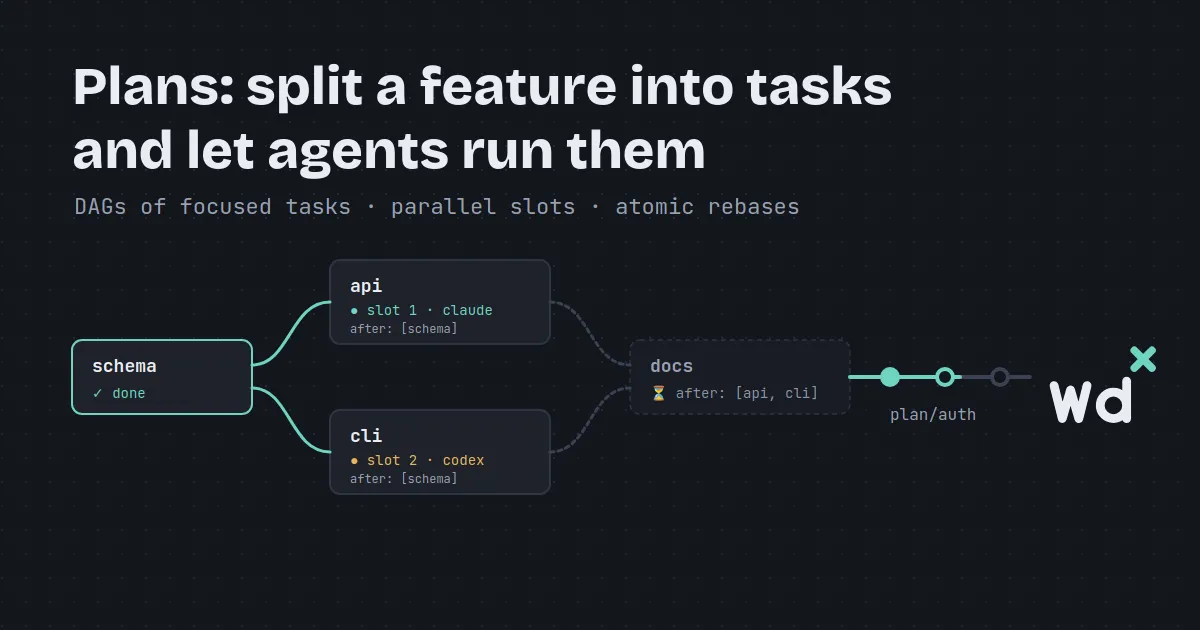
Asking an AI coding agent to build a multi-file feature in one giant prompt usually ends the same way: it loses track of constraints, hallucinates file state, or exhausts its context window halfway through.
The fix is to break the feature into a directed acyclic graph (DAG) of small, focused tasks—and let an orchestrator run each task’s agent in parallel as soon as its dependencies are ready.
When an AI agent works inside a single massive session across dozens of files, three things inevitably go wrong:
In traditional software development, we size tasks by developer hours or story points. When working with AI coding agents, that scale flips entirely. As I’ve found while building wdx with wdx:
“Each task spawns in its own worker agent. What I usually prefer is it should be completed within ~300k context size. Sometimes there are longer running workers as well, but on average I prefer each individual task to be done in a considerable amount of context. As the main purpose of wdx is to use agents, I’m no longer looking at tasks in terms of usual difficulty level; instead, I now changed my scale to the context size needed for a task to complete.”
Sizing tasks by context budget (~300k tokens) keeps every agent sharp, fast, and strictly bounded.
I never write plan YAML files by hand from scratch. Instead, I let an agent draft the plan, and I review it before anything executes:
“I’ve never written a plan by myself; I always let an agent write the plan. What I do is review the plan and make any modification before starting it. My usual flow is to brainstorm an idea with the AI agent, let it document the process using the wdx docs, and once I’m satisfied with the approach, the architectural design, etc., I ask it to make a wdx plan for it. Then I review the plan just to ensure that all the steps make sense, as the result of each plan is intended to be landed to
main, making sure that each plan in itself is deployable.”
Here is the three-step flow:
wdx doc create --name SSO).wdx plan create --name sso --path -.wdx plan status --name sso or open it in TIDE. You verify that every task has a clear boundary, sensible dependencies, and produces a deployable commit.A plan is pure YAML, validated by wdx whenever it is saved:
goal: Get the app ready for its first open-source contributors.constraints: - Run python3 -m unittest before each commit. - Keep each new documentation file concise.tasks: - id: contributing aca: claude_code model: sonnet prompt: | Create CONTRIBUTING.md explaining how to run the test suite, and commit it on this branch. - id: license aca: claude_code model: sonnet after: [contributing] prompt: | Create LICENSE with MIT license text, and commit it on this branch.Every plan definition contains:
goal (required): High-level purpose of the feature. Every worker agent is told this goal so it understands what its task contributes to.constraints (optional): A list of non-negotiable rules (e.g. test requirements, linters, style guidelines) passed to every task.tasks: The DAG nodes. Each task specifies:
id: Letters, numbers, and hyphens (up to 50 characters).aca and model: Which installed AI CLI and model execute the task (e.g. claude_code with sonnet, codex with gpt-5, or antigravity with gemini-4-argon-high).after: The list of tasks that must complete and land before this task starts. Tasks with no after start immediately.prompt: The task-specific instructions for the agent.wdx plan create --name first-release --path release.yamlEvery plan is checked on save: syntax errors, missing fields, unknown models, duplicate task IDs, and circular dependency cycles are caught immediately with line-numbered diagnostics (invalid_plan).
When you run a plan, wdx takes over as orchestrator:
wdx plan run --name first-releaseBehind the scenes:
plan/first-release from your project’s default branch..worktrees/<plan>-1, .worktrees/<plan>-2, up to plan.parallel (3 by default, or overridden via --parallel).goalconstraintsafterpromptYou are doing task license of the plan first-release, run by wdx.Goal: Get the app ready for its first open-source contributors.Constraints:- Run python3 -m unittest before each commit.- Keep each new documentation file concise.
Done before you, which this task waits for:- contributing: Created CONTRIBUTING.md with test suite instructions (commit 8a1b2c3).
Your task:Create LICENSE with MIT license text, and commit it on this branch.
When it is done, commit your work on this branch, then run: wdx plan task done --agent-id $WDX_AGENT_ID --summary "<what you did, in a few lines>"This context handoff is clean: the license agent never inherits hundreds of thousands of tokens of old shell output from contributing. It receives only the distilled summary and commit hash it needs, starting with a clean context window.
Here is a plan running on our toy notes repository:
While a plan runs, you can follow its progress from the CLI:
$ wdx plan status --name first-releasefirst-release: running, 1/2 tasks done, on plan/first-release goal Get the app ready for its first open-source contributors. constraint Run python3 -m unittest before each commit.TASK STATE ACA MODEL AFTER AGENT SLOTcontributing done claude_code sonnetlicense running claude_code sonnet contributing first-release-license first-release-1You can inspect individual tasks with wdx plan task get:
$ wdx plan task get --plan first-release --task contributingcontributing of first-release: done summary Created CONTRIBUTING.md with instructions to run unittests (a4b1c2d). agent first-release-contributing slot first-release-1In TIDE, press Enter on a plan in the left sidebar to open its visual dashboard. TIDE renders the DAG as a live commit-graph rail (just like git log --graph), showing status marks, dependency indicators (▲ needs, ▼ unblocks), and task details:
When a worker agent finishes its task, it runs:
wdx plan task done --agent-id $WDX_AGENT_ID --summary "Implemented user authentication routes"wdx handles the landing with strict verification:
not_committed. The agent cannot complete until everything is committed.wdx project landing --check "make test"), wdx executes that check in a dedicated background terminal named land-<slot>.plan/<name> using git rebase --onto.Because landing rebases onto plan/<name>, your plan’s branch stays clean and linear—no messy merge commits.
In autonomous software development, failures happen: an agent might write code that fails the test suite, or two parallel tasks might touch conflicting lines in the same file.
When a landing check fails or git hits a rebase conflict:
$ wdx plan status --name first-releasefirst-release: running, 1/2 tasks done, 1 failed, on plan/first-release goal Get the app ready for its first open-source contributors.TASK STATE ACA MODEL AFTER AGENT SLOTcontributing done claude_code sonnetlicense land failed: check (terminal land-first-release-1) claude_code sonnet contributing first-release-license first-release-1wdx does not crash or abort the rest of the plan. Independent tasks keep running. The failed task pauses and reports diagnostics:
$ wdx plan task get --plan first-release --task licenselicense of first-release: land failed: check (terminal land-first-release-1) after contributing agent first-release-license worktree /home/you/notes/.worktrees/first-release-1 check its output in the terminal land-first-release-1As the author notes:
“Usually a task can fail on conflicts, which can be easily resolved by retrying the task. It just needs a manual nudge that can be later on handled by wdx automatically, but for now I prefer to keep things manual.”
You have full control over how to resolve it:
wdx plan task retry --plan <name> --task <id>: Resumes the agent in its existing session, passing a note that explains the failure (the check failure output or conflicting files).wdx plan task retry --plan <name> --task <id> --fresh: Starts a brand new agent in the slot, informed of the earlier commits.wdx plan task land --plan <name> --task <id>: If you resolved the conflict or fixed the test manually inside .worktrees/<plan>-<n>, run this to re-run the check and rebase onto the plan branch.wdx plan task skip --plan <name> --task <id>: Skips the task, allowing downstream tasks to proceed.Plans scale from small tactical fixes to entire product architectures:
“I have executed both plans and plan of plans. It can be as simple as marking an agent limited when the ACA ran out of usage quota, or it can be as complex as building the complete hub feature with plan of plans.”
In wdx’s own history:
agent-limited: A single 5-task plan (buckets → limited → tide → checked → finish) that added quota limit tracking across all four AI CLIs.hub: A plan of plans comprising 10 sequential child plans (hub-sqlite → hub-settings → hub-clikit → hub-skeleton → hub-accounts → hub-login → hub-docs-push → hub-tunnel → hub-node-commands → hub-remote-tide). Each child plan ran its own DAG of worker agents, tested its domain, and landed to main before the next plan began.goal: | The wdx-hub MVP: the ten hub plans in order, each landing in main before the next starts.plans: - id: hub-sqlite - id: hub-settings after: [hub-sqlite] - id: hub-clikit after: [hub-settings] - id: hub-skeleton after: [hub-clikit] - id: hub-accounts after: [hub-skeleton] - id: hub-login after: [hub-accounts] - id: hub-docs-push after: [hub-login] - id: hub-tunnel after: [hub-docs-push] - id: hub-node-commands after: [hub-tunnel] - id: hub-remote-tide after: [hub-node-commands]goal: >- An agent is marked limited while a bucket its model draws on is limited, and not while another bucket of its ACA is.constraints: - Tests never touch the network and never start a real ACA. - Work only in the worktree the plan gave you.tasks: - id: buckets aca: claude_code model: opus prompt: Give aca.AiCodingAgent a ModelBuckets method... - id: limited aca: claude_code model: opus after: [buckets] prompt: Derive an agent's limit in the daemon... - id: tide aca: claude_code model: opus after: [limited] prompt: Show the limit in tide... - id: checked aca: claude_code model: opus after: [tide] prompt: Check the built daemon by hand... - id: finish aca: claude_code model: opus after: [checked] prompt: Update docs and the website...When you collaborate with human reviewers on GitHub, waiting for a PR review before writing the next piece can stall your team.
wdx supports stacked PRs directly in plan definitions:
pr: truestacked: trueWith pr: true, wdx automatically creates a pull request via gh when a plan completes. With stacked: true, a downstream child plan doesn’t wait for the upstream PR to be merged—it immediately branches from the upstream plan’s branch (plan/feature-b off plan/feature-a) and opens a stacked PR targeting plan/feature-a.
When the upstream PR is merged into main, running:
wdx worktree rebase --name feature-b-1detects the merge via GitHub’s API, rebases the commits onto main using git rebase --onto, and updates the PR target on GitHub automatically.
curl -fsSL https://raw.githubusercontent.com/srjn45/wdx/main/scripts/install.sh | shcd my-projectwdx project openwdx agent create --name planner --prompt "Read our architecture docs and write a wdx plan in plan.yaml for adding user export"wdx plan create --name export --path plan.yamlwdx plan run --name exportwdx tidePlans Guide
Read the complete guide to creating and managing plans in Plans.
Running Plans
Learn about slot limits, pause/resume, and landing checks in Running plans.
Docs & Plans in TIDE
Explore navigating the DAG rail, inspecting tasks, and handling retries in Docs and plans in TIDE.
GitHub Repository
Explore the codebase, read our development plans, and star the project on GitHub.