Four ways running several AI agents goes wrong, and how wdx fixes each
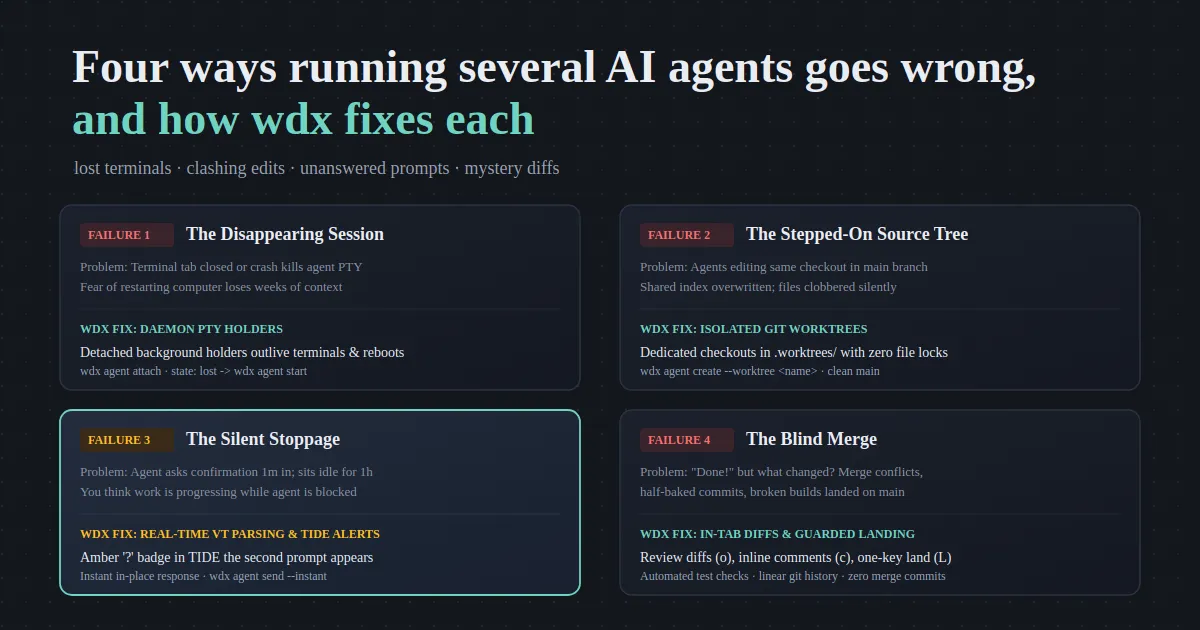
Running one AI coding agent is exciting; running three or four at once is where the developer experience falls off a cliff. Before you know it, you are juggling disappearing terminal tabs, clashing file edits, silently blocked agents waiting on input, and a chaotic mess of mystery diffs.
Most developers start by opening a handful of terminal tabs or tmux splits, firing up Claude Code, Codex, or Cursor in each, and hoping for the best. Within an hour, concurrency breaks down into confusion:
“agent waiting on response while i’m thinking that the work is progressing happened multiple times, and while running multiple agents manually it happened many times that multiple agents started working in main branch and interfered with each other’s work, moreover, not able to close terminal or shutdown/restart computer for days event months so that the curren work/context is not lost but with wdx i can resume working from where it left”
Here are the four classic failure modes of running multiple AI coding agents from plain terminals, why each happens, and the architectural primitives wdx uses to fix each.
Failure 1: The Disappearing Session (Lost Terminals)
Section titled “Failure 1: The Disappearing Session (Lost Terminals)”The problem
Section titled “The problem”When you run an AI agent inside a standard terminal window, tab, or SSH connection, the agent process lives and dies with that pseudo-terminal (PTY) session. If you accidentally close the tab, if your window manager crashes, if an SSH connection times out, or if your laptop forces a reboot, the process terminates abruptly.
Because of this vulnerability, developers develop coping mechanisms:
- Leaving terminal windows open for weeks or months at a time, dreading any reboot or system update.
- Cluttering the taskbar with dozens of minimized windows out of fear that closing one loses an agent’s active conversation state.
- Losing half-finished refactorings when a laptop battery dies or network connection resets.
How wdx fixes it: Daemon-Managed PTY Holders
Section titled “How wdx fixes it: Daemon-Managed PTY Holders”In wdx, agents do not run inside your terminal emulator. They execute inside dedicated background holder processes managed by a local background daemon:
- Process decoupling: The holder owns the PTY, the screen buffer, and the child agent process. When you attach with
wdx agent attachor view agents in TIDE, you connect to the holder over a Unix socket. Disconnecting (C-\ d) or closing your terminal window leaves the agent running unaffected. - Reboot recovery via
loststate: Even if your entire machine restarts or the daemon stops, wdx tracks the agent’s identity, directory, worktree, and ACA session in its database. When the daemon restarts, the agent appears inwdx agent listaslost. Runningwdx agent start --name <name>re-attaches to the exact ACA session and resumes work with full conversation context intact.
Failure 2: The Stepped-On Source Tree (Clashing Edits)
Section titled “Failure 2: The Stepped-On Source Tree (Clashing Edits)”The problem
Section titled “The problem”A git repository checkout has exactly one working tree and one staging index (.git/index). When you launch multiple agents from the root directory of your project, they all operate on the exact same checkout on main.
What follows is an inevitable train wreck:
- Overwritten edits: Agent A modifies
notes.pywhile Agent B is analyzing or rewriting the same file. One agent’s half-finished logic overwrites the other’s. - Corrupted staging index: Agent A stages files for a commit; Agent B runs
git commitor stages unrelated changes, bundling both features into an unparseable franken-commit. - Tangled
git status: You check the status of your branch and have no idea which modified file belongs to which agent’s prompt.
How wdx fixes it: Isolated Git Worktrees
Section titled “How wdx fixes it: Isolated Git Worktrees”wdx solves this at the filesystem level using git worktrees. Passing --worktree <name> to wdx agent create automatically creates a dedicated worktree in .worktrees/<name> branched from HEAD:
wdx agent create --name notes-delete --worktree notes-delete --aca claude_code \ --prompt "Add delete command"wdx agent create --name notes-search --worktree notes-search --aca codex \ --prompt "Add search command"Each agent gets:
- Its own working directory: File modifications happen in complete physical isolation under
.worktrees/. - Its own git index and branch: Each agent commits to its own dedicated branch. Staging or committing never interferes with other agents.
- A pristine main tree: Your repository’s main checkout remains 100% clean while multiple agents work concurrently in the background.
- Zero repository lock contention: wdx commands read worktree state without taking repository locks, allowing background monitoring to run alongside active git operations.
Failure 3: The Silent Stoppage (Unanswered Prompts)
Section titled “Failure 3: The Silent Stoppage (Unanswered Prompts)”The problem
Section titled “The problem”Of all the failure modes in multi-agent workflows, unanswered prompts are the single biggest productivity killer.
You prompt three agents with complex tasks, feel a surge of productivity, and switch to a different screen—reviewing architecture docs or attending a meeting. You assume the agents are deep in execution: parsing files, running tests, refactoring modules.
In reality, ninety seconds after you switched windows, Agent 2 paused to ask a routine confirmation question:
- “Do you want to run
npm test? (y/N)” - “File
schema.prismaalready exists. Overwrite? [Y/n]” - “Do you trust this folder to execute tools? (yes/no)”
Because plain terminal tabs have no notification mechanism, the agent sits completely idle. Forty-five minutes later, you check back expecting a finished implementation, only to find the agent blocked on a prompt that required a single keystroke.
Multiply this across three or four agents and your multi-agent concurrency collapses. You spend more time manually babysitting and polling terminal tabs than building software.
How wdx fixes it: Real-Time VT Screen Parsing & Amber TIDE Badges
Section titled “How wdx fixes it: Real-Time VT Screen Parsing & Amber TIDE Badges”wdx turns silent stops into immediate, actionable visual alerts:
- Headless Virtual Terminal (VT) screen engine: wdx runs a headless VT state machine for every agent’s PTY. Instead of polling process exit codes or scraping logs after the fact, wdx parses the terminal output stream in real time. It reliably classifies agent activity into three canonical states:
working,idle, orwaitingon human input. - Prominent amber badges in TIDE: In TIDE (
wdx tide), an agent waiting on a question turns into a bright amber row with a?badge in the project navigator. You know the exact second an agent needs attention without hunting across tabs. - Instant in-place response: You do not need to switch terminals. In TIDE, navigate to the amber row and press
o(or Enter) to open the agent’s live screen. Press the required key (e.g.,yor Enter), and the agent immediately transitions from amberwaitingback to greenworking. - Safe inbox steering: If you prefer working from scripts or the CLI,
wdx agent sendqueues input in an agent inbox. It waits until the agent’s terminal is in raw mode and ready to accept input before pasting, preventing garbled or dropped keystrokes. Using--instantimmediately interrupts or prioritizes your input.
Failure 4: The Blind Merge (Mystery Diffs)
Section titled “Failure 4: The Blind Merge (Mystery Diffs)”The problem
Section titled “The problem”An agent reports: “I have finished adding the search command and all tests pass.”
What did it actually touch? In a traditional terminal workflow, verifying the agent’s work is surprisingly painful:
- You have to manually run
git diff <branch>..mainin a separate shell. - If the agent modified multiple files, you have to scroll through raw terminal diffs or open an external GUI diff tool.
- If you notice a minor mistake, you have to craft a follow-up prompt, switch back to the agent’s tab, and explain line-by-line what needs fixing.
- When you are ready to integrate, running
git mergeoften introduces unwanted merge commits or undetected regressions.
How wdx fixes it: In-Tab Diff Review & Guarded Landing
Section titled “How wdx fixes it: In-Tab Diff Review & Guarded Landing”wdx integrates diff review and landing directly into the development workflow:
- In-tab visual diff (
o): In TIDE, selecting a worktree and pressingoopens a color-coded unified diff tab right beside your agents. You can inspect additions, deletions, and modified files with zero context switching. - Inline line commenting (
cands): When reviewing an agent’s diff, presscon any line to leave a comment. Presssto batch-dispatch your review comments back to the agent’s inbox as concrete revision requests. - One-key guarded landing (
L): When the diff looks good, pressL. wdx automatically runs your project’s configured pre-landing test checks (viawdx project landing), rebases the commits ontomainwith a clean linear history, and prompts you to remove the temporary worktree.
Comparison Matrix: Plain Terminals vs. wdx
Section titled “Comparison Matrix: Plain Terminals vs. wdx”| Failure Mode | Plain Terminal Tabs | wdx Architecture |
|---|---|---|
| Lost Terminals | Window crash or reboot terminates PTY; sessions lost permanently | Daemon-managed PTY holders outlive terminals; resumes via wdx agent start |
| Clashing Edits | Agents collide in shared root on main; files overwritten & index dirty |
Isolated git worktrees (--worktree) in .worktrees/; clean main tree |
| Unanswered Prompts | Agent stalls on prompt silently; hours lost with zero notification | Real-time VT screen parser flags waiting; amber row & ? badge in TIDE |
| Mystery Diffs | Manual git diff archaeology; risky merge commits & broken builds |
In-tab diff review (o), inline comments (c), and one-key guarded landing (L) |
Try It
Section titled “Try It”You can run your multi-agent workflow under wdx in four simple steps:
-
Install wdx:
Terminal curl -fsSL https://srjn45.github.io/wdx/install.sh | sh -
Open your project:
Terminal cd ~/dev/my-projectwdx project open -
Launch agents in isolated worktrees:
Terminal wdx agent create --name feature-auth --worktree auth --prompt "Implement JWT token validation"wdx agent create --name feature-docs --worktree docs --prompt "Update API documentation in docs/" -
Open TIDE to steer your fleet:
Terminal wdx tide
Quit TIDE anytime with C-q q. Your agents keep executing in the background, their checkouts remain isolated, and any waiting prompt is always flagged before it stalls your day.